

Schedule C categories and the accountant export
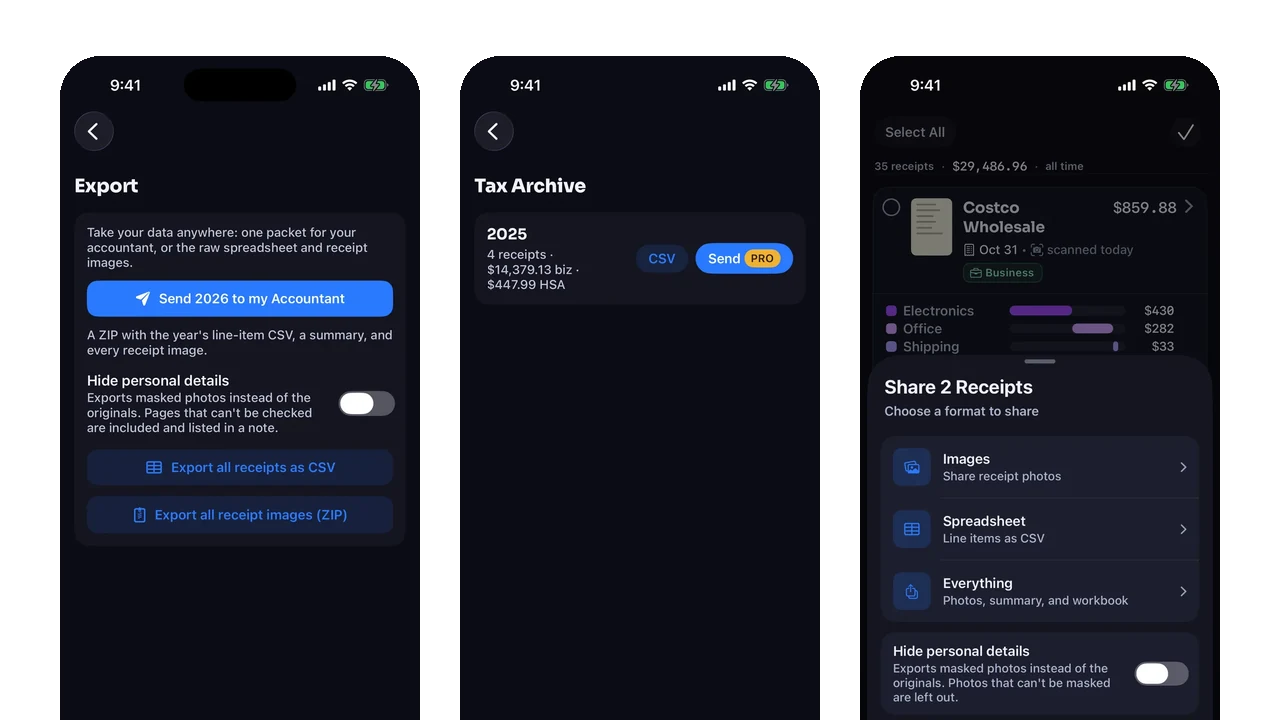
The accountant export is not a magic tax return. It is a packet: line items, totals, review flags, and the receipt images or PDFs for one tax year. Its job is to hand over evidence, not decide what you may deduct.
On this page
- The zip is scoped to one tax year
- The receipt files are part of the answer
- The Totals tab is a reading guide
- Meals (50%) is a label, not a formula
- Review issues stay visible
- The export is built from line items
- How to inspect the packet
- Why the export is different from sync
- What the export deliberately leaves alone
- FAQ
- What is in the accountant export?
- Is the accountant export a Pro feature?
- Does the workbook decide my tax treatment?
- Does the meals category get cut in half?
- What happens when line items do not add up?
- Are problem receipts excluded?
- Related
The accountant export should be boring. That is the compliment.
At tax time, a useful packet does not try to impress anyone. It says what was bought, what was tagged business, where the source document is, and which rows need a closer look. Then it stops. The moment the export starts deciding deductibility, it has crossed from organizing evidence into giving tax advice.
Receipt Rabbit’s export is built around that boundary. The expense reports and tax-year export page lists what is in the package and which plan includes it.
The zip is scoped to one tax year
The export creates one packet for one year. Inside the zip is a folder named for that year. The folder contains a line-item CSV, an XLSX workbook, and a receipts/ folder with the year’s staged receipt assets.
The workbook has three tabs: Totals, Receipts, and Line Items. The CSV has one row per line item with the essentials an accountant needs: date, merchant, category, description, amount, whether it is business, and a Needs review flag.
That is the shape an accountant can work from. It has the row-level numbers and the paper behind them.
The receipt files are part of the answer
A spreadsheet without receipt images is a claim. A spreadsheet with receipt images is evidence someone can inspect.
Receipt Rabbit stages receipt assets through the export so the accountant zip, bulk shares, and single-receipt shares use consistent naming. Image-only receipts can be wrapped for export; PDFs stay PDFs. The export is meant to answer the follow-up question: show me the document behind this line.
That is especially important for ambiguous documents: invoices, statements, faded paper, and receipts whose line items do not reconcile perfectly. The table tells you what the app extracted. The image tells you why.
The receipts folder also keeps the spreadsheet from becoming an orphaned summary. If a category total raises a question, the review path is direct: find the line, open the receipt file, and compare the row to the source document. That is the whole point of bundling assets with the workbook.
The Totals tab is a reading guide
The Totals tab starts with receipt count, Total spend, Business, and HSA/FSA totals. Then it shows business spend by the business category names and spend by purchase category.
The business section is headed “Business spend by Schedule C line,” but the rows beneath it are category names, such as Supplies & Materials, Meals (50%), and Contract Labor. The vocabulary is tax-shaped, and the export still does not print numbered Schedule C line labels.
That distinction is deliberate. Mapping a purchase to a tax form can depend on context the app does not have. The export prepares the handoff; it does not replace the judgment.
Meals (50%) is a label, not a formula
The Meals (50%) category is easy to misread. It does not mean the workbook halves the row. The workbook totals are plain sums of line-item amounts.
That is the right restraint. If you spent 42.00 and tagged the line as a business meal, the export reports 42.00 in that category. How that amount is treated belongs with your accountant or tax preparer.
A label can help a human review the file without turning the app into the decision-maker.
Review issues stay visible
The accountant bundle excludes a narrow set of receipts: possible duplicates, failed scans, and receipts with no total. Those would either double-count, contribute no data, or lack an amount to report.
Other issues can stay in. If line items do not add up to the printed total, the export can show a Needs review reason rather than silently dropping the receipt.
This is the part that feels less tidy and works better. A flagged row gives the accountant something to inspect. A missing row gives them nothing.
The export is built from line items
The export’s value comes from line items. A receipt total alone cannot say which part was business, which part was personal, which part was tax, or which part was a discount.
Each line item carries a purchase category and can carry a separate business category. Adjustment rows travel with their signed amount. Quantity and unit price fields appear where they exist. This is why the CSV is more useful than a folder of image files, and why the images are still needed beside the CSV.
For live bookkeeping systems, Receipt Rabbit can also sync to QuickBooks Online, Xero, or Lunch Money. The accountant export has a different job: year-end review in one packet.
How to inspect the packet
Before sending any export, check five things:
- Is the year correct?
- Do the receipt files exist beside the workbook?
- Do business lines reflect tags you meant to apply?
- Are Needs review reasons visible instead of hidden?
- Does the file avoid making tax conclusions for you?
If that all holds, the export is doing what it should: saving sorting time while keeping the human decision intact.
Why the export is different from sync
Sync and accountant export solve different problems. QuickBooks Online and Lunch Money need current transactions to land in the right place so your books stay up to date. The accountant export is a year-end packet. It is designed for review, substantiation, and questions.
That difference changes the shape. A sync destination may care about the matched transaction, the account, and the categories being written today. The export cares about the whole tax year and the evidence behind each row. It includes receipt files because a reviewer may need to inspect the original. It includes Needs review because the hard cases should not vanish at year end.
Both flows depend on line items, but the packet has a colder job: make the year legible after the rush is over.
What the export deliberately leaves alone
The export does not create tax positions. It does not apply the meals percentage. It does not decide that a personal-looking purchase was actually business. It does not turn a blank business category into a guessed one. Those omissions are features.
The app can know that you tagged a line business. It can know the category label attached to that tag. It can know the receipt image, date, merchant, total, and adjustment rows. It cannot know the surrounding facts that make a deduction defensible.
A good accountant packet should therefore be easy to inspect and hard to mistake for advice. That is the line this export tries to hold.
There is another quiet benefit: the packet is year-scoped. A user can share a handful of selected receipts from the app, but that is a different workbook shape. The accountant bundle is built for a tax year, so totals, receipt files, and line-item rows all speak the same time period. That keeps a quick share from masquerading as a year-end report.
That separation also helps with follow-up questions. If an accountant asks for the paper behind one line, you can point to the receipt file. If they ask why a line was business, you can point to the tag and category. Those are different answers, and the export keeps them separate.
FAQ
What is in the accountant export?
One zip for a tax year: a line-item CSV, an XLSX workbook with Totals, Receipts, and Line Items tabs, and that year’s receipt image or PDF assets.
Is the accountant export a Pro feature?
Yes. The tax-year accountant ZIP and generated reports require Pro. Plain CSV spreadsheet exports and receipt image ZIP exports are available on the Free plan.
Does the workbook decide my tax treatment?
No. It reports the business tags and category labels attached to line items. Tax treatment depends on your facts and your accountant’s judgment.
Does the meals category get cut in half?
No. Workbook totals are sums of tagged line amounts. The Meals (50%) label is a review cue, not a calculation applied by the export.
What happens when line items do not add up?
The receipt can be flagged with a Needs review reason, and the Totals tab still ties back to the receipt totals while the unexplained gap stays visible.
Are problem receipts excluded?
Only a narrow set is excluded from the bundle, such as possible duplicates, failed scans, and receipts with no total. Other review issues travel in the Needs review column.
Related
For a published example of mixed purchase categories on one receipt, read Why your app files a Costco receipt as one category.
Receipt Rabbit builds a tax-year packet from line items and receipt files so your accountant can review the evidence instead of rebuilding it. Download Receipt Rabbit