

Receipt Rabbit's free tier: 30 categorized receipts a month, no account
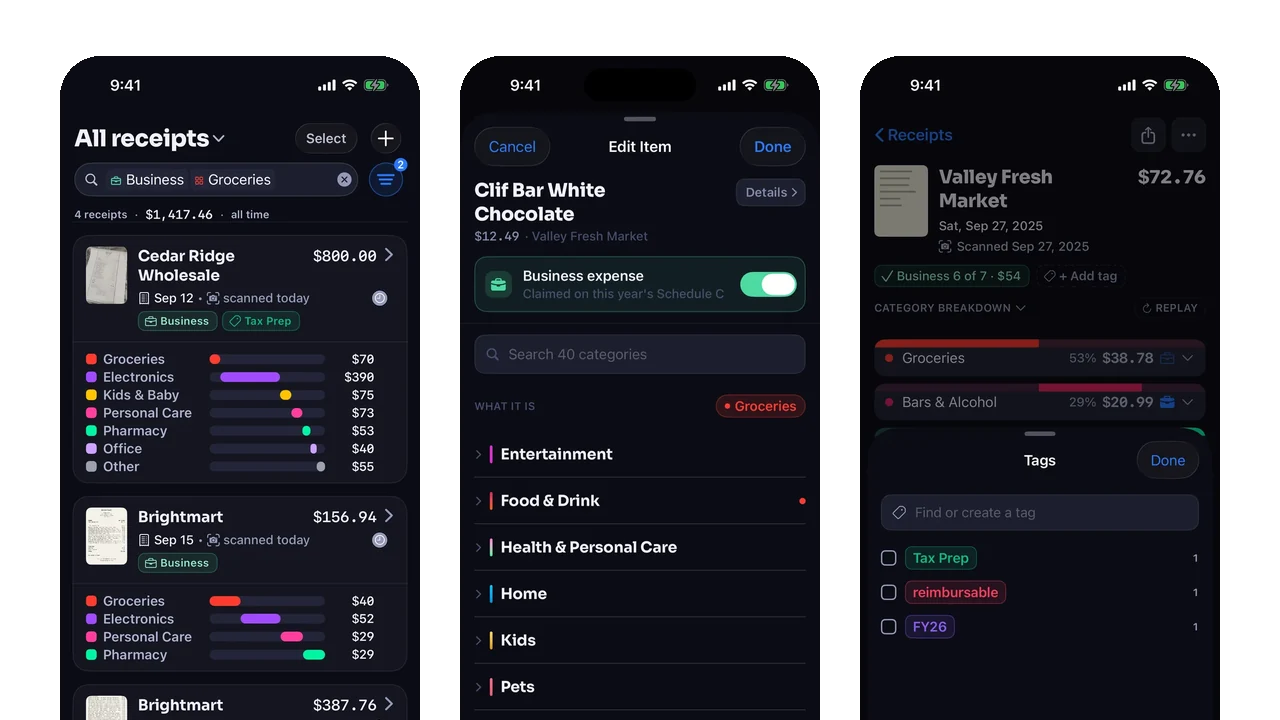
Short answer: Receipt Rabbit works without a subscription, indefinitely. The free tier categorizes 30 receipts a calendar month, line by line, and keeps scanning, saving, search, business and HSA/FSA tagging, plain spreadsheet export, and private iCloud storage free with no account. Plus raises the monthly count to 100 and adds Lunch Money sync, while Pro raises it to 300 and adds QuickBooks Online, Xero, and Lunch Money sync, expense reports, and tax-year accountant exports. Email forwarding is included in Free.
On this page
- What does the free tier include?
- What happens on receipt 31?
- Who are Plus and Pro for?
- Why is there still a monthly number at all?
- What do Plus and Pro cost?
- Five questions to ask any “free” receipt scanner
- Frequently asked questions
- Is email forwarding included in Free?
- Is there a receipt scanner app for iPhone that works without a subscription?
- How many receipts can I scan for free?
- What happens when I hit the free limit?
- Does the free tier sync to QuickBooks Online or Lunch Money?
- Do I need an account to use the free tier?
- Is Pro unlimited?
- Sources
Receipt Rabbit works free, indefinitely, without a subscription. The free tier categorizes 30 receipts a month, line by line, and everything you need to keep, search, and export your own records stays free.
- No expiration date. The free tier is a monthly allowance, not a trial.
- No login, no email address. Not on Free, Plus or Pro.
Free, Plus, and Pro differ in three places:
- Monthly categorization count: 30 on Free, 100 on Plus, 300 on Pro.
- Automatic sync: Lunch Money on Plus and Pro; QuickBooks Online and Xero on Pro.
- Generated expense reports and tax-year packages for an accountant (Pro only).
The rest of this post covers every feature, what happens on receipt 31, and where sync and generated reports require Plus or Pro. Email forwarding is included in Free.
What does the free tier include?
| Feature | Free | Plus | Pro |
|---|---|---|---|
| Scan and save receipts to your vault | Yes | Yes | Yes |
| Every line item categorized independently (42 categories in 11 groups) | 30 receipts a month | 100 receipts a month | 300 receipts a month |
| Tag lines as business or HSA/FSA | Yes | Yes | Yes |
| Search and filter the vault | Yes | Yes | Yes |
| Vault mirrored to your private iCloud | Yes | Yes | Yes |
| Set up email receipt forwarding to your private @receiptrabbit.io address | Yes | Yes | Yes |
| Export a plain CSV spreadsheet of all your receipts and line items | Yes | Yes | Yes |
| Export all receipt images (ZIP) | Yes | Yes | Yes |
| Share selected receipts as photos or a line-item spreadsheet | Yes | Yes | Yes |
| Sync to Lunch Money | No | Yes | Yes |
| Sync to QuickBooks Online or Xero | No | No | Yes |
| Expense reports, tax archive, summaries, and accountant export ZIP (spreadsheet, Excel workbook, and photos) | No | No | Yes |
| Account or login required | No | No | No |
Every receipt you categorize, on any tier, gets full line-item categorization across 42 categories in 11 groups.
- One store run, many categories. A single trip can put items into Groceries, Pharmacy, Pets & Supplies, and Bars & Alcohol at once.
- Adjustments follow the receipt. Coupons, discounts, fees, taxes, and tips attach to the receipt’s main category, with their plus or minus signs intact.
Your own data is always exportable, on the free tier too:
- Share selected receipts as photos or a line-item spreadsheet.
- Export all your receipts and line items as a spreadsheet from Settings.
- Export all your receipt photos as a ZIP from Settings.
What happens on receipt 31?
Nothing is refused. Reaching the monthly allowance never blocks the camera or turns a receipt away. When you scan a 31st receipt in a calendar month:
- Receipt Rabbit saves the receipt and its photo to your vault, on your iPhone and in your private iCloud.
- The receipt waits in your review queue with a “Monthly scan limit reached.” banner.
- It stays uncategorized until scans are available again.
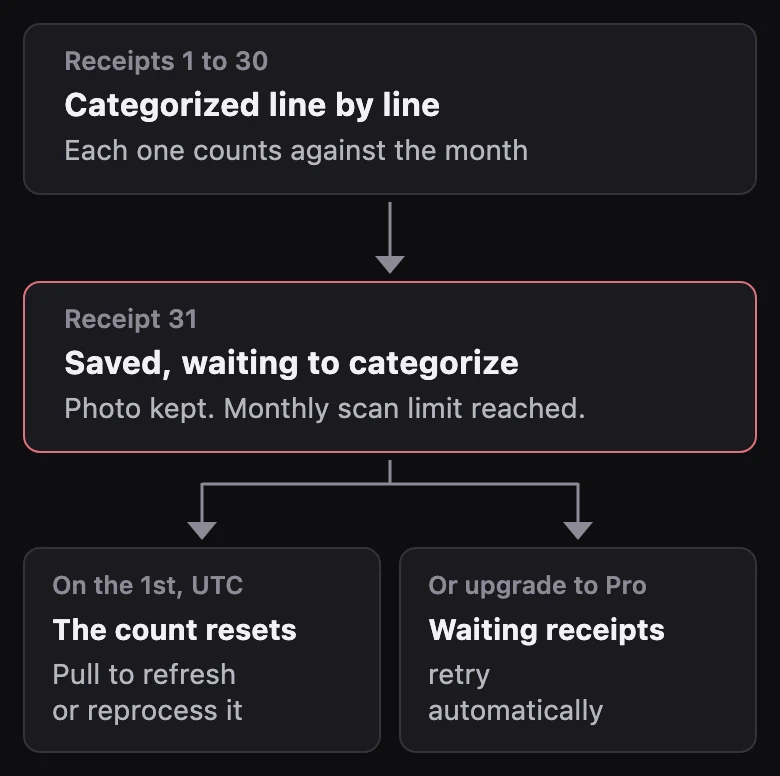
How the meter works:
- It counts categorization requests: one per receipt, however many pages the PDF has.
- It resets on the 1st of each calendar month at UTC midnight.
- A new month doesn’t spend your new allowance on last month’s waiting receipts automatically.
To categorize a receipt that waited, pick one:
- Next month: pull to refresh in the Receipts tab, or tap reprocess on the receipt.
- Right away: upgrade to Plus or Pro, and waiting receipts retry automatically.
Who are Plus and Pro for?
Plus and Pro include everything in Free. Plus raises the limit to 100 categorized receipts a month and adds Lunch Money sync. Pro adds three things:
- Lots of receipts: 300 categorized a month instead of 30.
- Books in QuickBooks Online, Xero, or Lunch Money: receipts sync straight in, so you don’t re-enter them.
- Reports and tax time: expense reports and a detailed tax-year packet, a workbook plus a ZIP of the photos, ready to hand to your accountant.
If you do not need those features, you can stay on the free tier. Keeping scanning, search, and your own exports free means:
- Casual users and freelancers can stay on the free tier indefinitely.
- Heavy users and businesses fund the servers.
Why is there still a monthly number at all?
Each categorization costs us money. Every receipt goes to a cloud model:
- Personal details are hidden on your iPhone before the receipt is sent.
- The image isn’t kept on our servers after categorization.
- Each request has a direct compute cost, so all three tiers have a monthly number enforced on the server: 30 on Free, 100 on Plus, 300 on Pro.
To see which tier fits you, count the receipts you saved last month and compare that number to 30, 100, and 300.
What do Plus and Pro cost?
- Plus: $4 a month, or $30 a year, in the US (no free trial).
- Pro: $8 a month, or $60 a year (about $5.00 a month), in the US.
- The Pro annual plan includes a 7-day free trial for eligible new subscribers.
- No lifetime or one-time purchase option.
The price and trial shown in the app come straight from the App Store, and those are the terms that apply.
Plus and Pro still need no account. Your subscription goes through the App Store anonymously, and restoring it on a new iPhone uses the App Store’s built-in restore through your Apple Account [1]. The About page explains how the app works with no account.
Five questions to ask any “free” receipt scanner
- Is the free tier a monthly allowance that renews, or a one-time trial with an expiration date?
- When you hit the limit, does the app still save your receipt photo, or does it block you?
- Does the free tier categorize every line item, or only read the total?
- Can you export all your receipt photos and a full line-item spreadsheet without paying?
- Does it work without an account, and how are personal details handled before a receipt is processed?
Frequently asked questions
Is email forwarding included in Free?
Email forwarding is included in Free.
Is there a receipt scanner app for iPhone that works without a subscription?
Yes. Receipt Rabbit works free, indefinitely, without a subscription or an account. The free tier categorizes 30 receipts a calendar month line by line, while scanning, saving, searching, plain spreadsheet export, and private iCloud storage stay free.
How many receipts can I scan for free?
As many as you want. The monthly meter counts line-item categorizations: 30 a calendar month on the free tier, 100 on Plus, and 300 on Pro.
What happens when I hit the free limit?
The receipt is saved, with its photo, and marked as over the monthly scan limit until it can be categorized. Upgrading to Plus or Pro retries it automatically. After the count resets on the 1st at UTC midnight, pull to refresh in the Receipts tab or reprocess the receipt.
Does the free tier sync to QuickBooks Online or Lunch Money?
No, sync is a Plus and Pro feature. The free tier keeps your categorized and tagged receipts in your vault on your iPhone and in your private iCloud, and you can export a spreadsheet or a ZIP of photos from Settings at any time.
Do I need an account to use the free tier?
No. Receipt Rabbit has no account and no login on any tier. Purchases and restores go through your Apple Account on the App Store.
Is Pro unlimited?
No. Pro includes 300 categorized receipts a calendar month, sync to QuickBooks Online, Xero, and Lunch Money, expense reports, and tax-year accountant exports.
Sources
- Apple Support, If you can’t find or use your in-app purchases, for how a subscription is restored through the same Apple Account.
Last checked 2026-10-14.
Receipt Rabbit is on the App Store. Download it here.